Order lifecycle
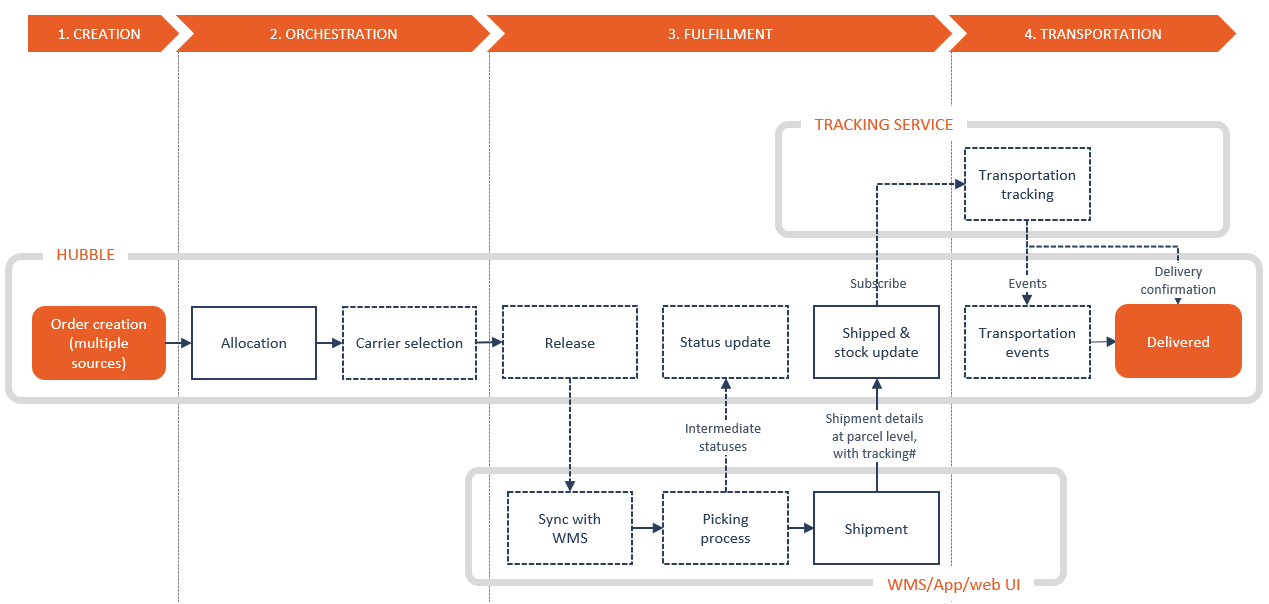
Distribution flow falls into 4 major steps:
- Order creation
- Order orchestration
- Order fulfillment
- Order transportation
Definitions
Outbound Orders
Outbound Orders are orders to be fulfilled and shipped from a given warehouse. They can be B2B orders, B2C orders, return to suppliers, ...
Shipments
Shipments represents goods in transportation which has been shipped as once from a specific connection (= the shipper), on the same vehicle.
Shipping Units
Shipments are composed of one or several Shipping units, which are the base unit of transportation. Each Shipping Unit has its own destination (the consignee), and can be of different types depending on the business context (container, pallets, parcels, ...) Hence, one shipment could be at destination of several consignees.
Shipping unit lines are linked to its original Outbound order lines.
Outbound order statuses
Status shows in which step of the fulfillment lifecycle is the Outbound Order.
| Status | Definition |
|---|---|
| Hold | The order is blocked and can't be processed if not released |
| Created | The order has been created in Hubble |
| In WMS | The order has been synchronized with WMS |
| Waved | The order has been selected in a wave |
| Picking | Picking has started: first SKU scanned and picked |
| Picked | Picking is finished for the whole order |
| Partially | The order has been partially shipped, we expect further shipments for this order |
| Fulfilled | The order has been shipped entirely and shortages have been confirmed and processed |
| Cancelling... | A cancellation request has been sent to WMS, waiting for cancellation confirm feedback |
| Cancelled | The order has been successfully cancelled |
Creation
An order can be created by several ways:
- input of a single order in web UI form
- mass upload orders by Excel
- creation by API
- EDI with ERP
- use of Hubble connectors (Shopify, Qimen, ...)
Orchestration
Once an order is created in Hubble, an algorithm called Orchestration will be run by Hubble in order to define how the order will be served.
- Auto-hold: if set, orders will be first hold in order to be manually verified before fulfillment
- Allocation: select a stock line and reserve stock
- Carrier selection: if set, select the best carrier for this order.
Auto-hold
OptionalIf set, order initial status will be set to Hold instead of Created (default behavior). Hold orders needs to be manually released.
Allocation
If the order's ship from is a connection with stocks, the stock is reserved: Available stock is deducted, Allocated stock is increased.
See inventory changes during order flow
Transportation helper
OptionalTransportation Service selection
Hubble can select the ideal Transportation Service for the Outbound Order depending on any criteria, based on any order headers fields. Some example of business scenario:
- select a premium transportation service if the order amount is more than XXX, if the customer is VIP, if the order has fragile products, ...
- choose the optimal carrier depending on the destination and order volume & weight, from express, to LTL then to full truck service.
The selection process only runs for orders where the Transportation Service is originally undefined.
It means that the Transportation Service could be forced by a 3rd party system (ERP, OMS) or by user input in UI. In that case, even if Transportation Service selection is enabled, the forced Transportation Service will be kept.
Transportation Service selection can be disabled: in that case the outbound order will keep the Transportation Service input from ERP/OMS or from user, even if undefined.
Automatic tracking assignment
If the Transportation Service is a Chinese express company, Hubble can request a pick-up to the express company, grab a tracking number, and generate a transportation label.
Currently the API providers available in Hubble are:
| API provider | Description | Automatic tracking assignment | Automatic label | Express services implemented |
|---|---|---|---|---|
| Kuaid100 | Professional service to access main express services in China | Y | Y (document available trough URL: image or pdf) | ZTO, STO, YTO, SF, EMS |
| Cainiao | Logistics online platform by Alibaba, only available for TMall orders | Y | Y (encrypted printing data that can be injected in Cianiao printing tool called x-print) | ZTO, STO, YTO, SF, EMS |
Fulfillment
Fulfillment lifecycle
Release
OptionalIf the order was hold, it needs to be manually released in order to let warehouse to process the order.
A hold order won't be synchronized to WMS, and will neither be available for picking in Hubble Warehouse App neither be available for shipment in Hubble Web UI.
Synchronization with WMS
Case WMSOrder is synchronized with WMS or 3PL service.
Intermediate statuses
Case WMSIf the 3PL has such capability, intermediate status can be synchronized back:
- In WMS: the order has been successfully created in WMS
- Waved: the order has been selected in a picking wave
- Picking: picking have been started for this order (at least one SKU scanned)
- Picked: picking have been finished for this order, waiting for carrier pick-up
Shipment
Order can be shipped either:
- from 3PL, by receiving shipment message from WMS
- from Web UI, either by creating a shipment or by using Quick ship function
- from Hubble warehouse app, when validating picking
When process a shipment:
- If the order is shipped in full, order status is changed to Fulfilled
- If the order is partially shipped (meaning that shipped quantity < ordered quantity in one of the order line):
- If by settings, we allow partial shipment: order status is changed to Partial. Hubble can accept additional shipments, and missing quantities are not processed until final shipment.
- If don't allow (default behavior): order status is changed to Fulfilled. Missing quantities are processed as shortages.
Shipped quantities are always processed by deducting Allocated stock.
Hubble will process shortages by releasing reserved quantities, meaning that by moving quantities back from Allocated to Available. If the shortage is because the stock has been lost, another movement should be done in order to deduct Available stock.
Shortages are only processed when the order is totally Fulfilled, not when order is Partial
Exceptions
Hubble can manage several exception flows during fulfillment flow.
Cancellation
Trigger
Order can be cancelled in Hubble by several ways
- Through UI, using Cancellation function
- Through API or EDI, by an external system (WMS, ERP, OMS, ...)
- Through Hubble connectors, such as Qimen
Processing
There are 2 cancellation processes:
- If there is a WMS, and this WMS has the capability to confirm that the cancellation is effective, we can set a 2 steps process:
- Hubble sends a cancellation request to WMS, and change order status to Cancelling...
- When Hubble receive cancellation confirmation from WMS, Hubble change order status to Cancelled
- If no, order will be directly set to status Cancelled
This behavior is controlled by parameter "Force direct cancellation for Outbound orders" in company settings. Default behavior is 2 steps cancellation.
Once the order is successfully Cancelled, all quantities are deducted from Allocated stock and incremented in Available.
Cancellation flows with WMS
With WMS, we can consider 2 scenarios
- Before wave: the order is automatically cancelled without human interaction. The order will be effectively cancelled in Hubble after a few minutes after cancellation request (the time needed to exchange messages between systems).
- After wave: the order is in progress of picking, and cannot be automatically cancelled. Once the order is intercepted (at packing or at loading), the order can be cancelled by warehouse operator.
- Direct cancellation by WMS: if the cancellation is initiated by WMS, the process becomes a one-step cancellation
Modification
Triggers
Order can be modified in Hubble by several ways
- Through UI, using Edit
- Through API or EDI, by an external system (WMS, ERP, OMS, ...)
- Through Hubble connectors, such as Qimen
Processing
There are 2 modification processes:
- Direct modification (only available before wave if WMS): the order is modified directly (the data is overwritten). The data is resent to WMS.
- Versioning: Hubble keep the old order and create a new version with modified data. The new order is Hold until the old order is Cancelled:
Versioning process is only used by connectors (Qimen)
Transportation
Case trackingHubble can track transportation by several ways:
- Chinese express companies, through our partner kuaidi100
- Sea freight containers, through our partner Project44
- Hubble Carrier app
In case you subscribe to transportation tracking, Hubble will receive back transportation events for each Shipping Unit. Shipping Unit will have intermediate status:
- In transit when carrier confirms pick-up
- Delivered when carrier confirms delivery
- track some transportation anomalies such as Cancelled or Not delivered