Transactions view
Discover first the basic concepts about inventory management in Hubble.
In the current documentation, we will use either Transaction either Movement to describe the same concept.
Definition
A transaction records a stock change, and any stock change will be recorded by a transaction.
A transaction is directly linked to a Stock Line, and therefore will record a change on a given SKU, warehouse, owner, lot or S/N and expiry date.
The recorded change could be either a move from a position to another one, either an adjustment on one of the position.
Transactions are frozen data: transactions are written once by Hubble, and can never be changed later on.
Transaction list
View
Transactions list can be accessed through the menu Transactions in INVENTORY section:
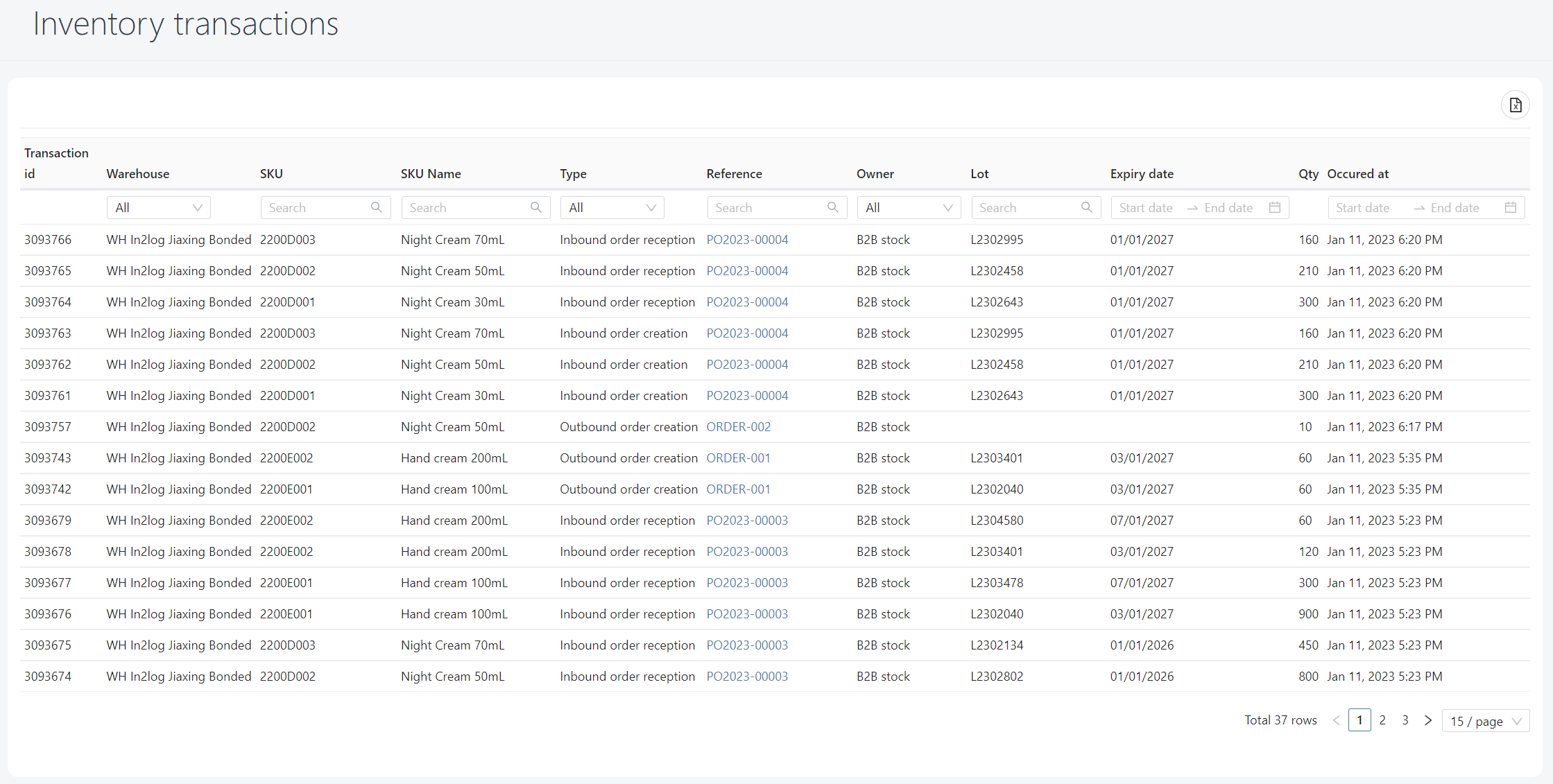
Transactions are ordered from newest to oldest: the most recent transactions are displayed on top
Fields
| Field | Definition |
|---|---|
| Transaction id | Unique identifier for this movement |
| Warehouse | Warehouse impacted (from the stock line) |
| SKU | Code of the SKU impacted (from the stock line) |
| SKU name | Name of the SKU impacted (from the stock line) |
| Type | Scenario that created this movement, see types below |
| Reference | Element that created this movement, see references below |
| Owner | Owner impacted (from the stock line) |
| Lot or S/N | Lot or S/N impacted (from the stock line) |
| Expiry date | Expiry date impacted (from the stock line) |
| Qty | Quantity moved or adjusted for this line |
| Occurred at | Date and time of occurrence of this movement |
Transaction types and references
Transaction type explains which scenario has created this movement. Types will provides which position has been impacted: either a plus and minus on different positions (= move), either just a plus or a minus in one of the position (= adjustment)
Transaction reference explains which element (generally, which order) has created this movement.
This section provides all transaction types and references used by Hubble:
Inbound
For inbound, the Reference field will always be filled with Inbound order number
| Type | Minus | Plus | Scenario |
|---|---|---|---|
| Inbound order creation | - | Incoming | Creation of an inbound order |
| Inbound order reception | Incoming | Available | Reception of an inbound order |
| Inbound order cancellation | Incoming | - | Inbound order has been fully cancelled OR some quantities are missing after closure of a partially received order |
| Inbound order overreception | - | Incoming | If the company allow receiving more than ordered quantities, Hubble will force creation of additional incoming quantities, then receive it with "Inbound order reception" transaction |
Outbound
For inbound, the Reference field will always be filled with Outbound order number
| Type | Minus | Plus | Scenario |
|---|---|---|---|
| Outbound order creation | Available | Allocated | Creation of an outbound order: the stock is allocated |
| Outbound order fulfilled | Allocated | - | Shipment of an inbound order: allocated quantity is deducted, stock is removed from Hubble |
| Outbound order cancellation | Allocated | Available | Cancelled quantity are de-allocated, the quantities becomes available gain for sales |
| Outbound order overship | Available | Allocated | If the company allows shipping more than ordered quantities, Hubble will force allocation of more quantities, then ship it with "Outbound order fulfilled" transaction |
Stock management
| Type | Minus | Plus | Scenario |
|---|---|---|---|
| Negative adjustment | Available | - | Stock has been lost during stock-take, or other scenario where stock should have been removed without order |
| Positive adjustment | - | Available | Stock has been found during stock-take |
| Inventory blocked | Available | Blocked | Stock is blocked, therefore not available for sales (Quarantine, Damaged, Expired, ...) |
| Inventory released | Blocked | Available | Stock is released, available back for sales (ex: end of quarantine after QC check) |
| Lot/serial change (negative) | Available | - | Stock was entered on the wrong lot or expiry date, therefore the stock for the wrong lot will be removed. It would be paired with a transaction "Lot/serial changed (positive)" for the right lot |
| Lot/serial change (positive) | - | Available | Stock was entered on the wrong lot or expiry date, therefore the stock for the right lot will be added. It would be paired with a transaction "Lot/serial changed (negative)" for the wrong lot |
| Owner change (negative) | Available | - | Stock has been changed from one owner to another, therefore the stock for the old owner will be removed. It would be paired with a transaction "Owner (positive)" for the new owner |
| Owner change (positive) | - | Available | Stock has been changed from one owner to another, therefore the stock for the new owner will be added. It would be paired with a transaction "Owner (negative)" for the old owner |
| SKU change (negative) | Available | - | Stock was entered on the wrong SKU, therefore the stock for the wrong SKU will be removed. It would be paired with a transaction "SKU (positive)" for the right SKU |
| SKU change (positive) | - | Available | Stock was entered on the wrong SKU, therefore the stock for the right SKU will be added. It would be paired with a transaction "SKU changed (negative)" for the wrong SKU |
Example
Through this section, you will learn how to read a sequence of transactions that happened on a specific business case.
Business scenario
In warehouse "In2log Jiaxing Bonded", Inbound order PO2023-00003 has been created then received on Jan, 11, 2023. Operations received 2 lots for SKU 2200E002 (Night Cream 70mL):
- 120 pcs for lot L2303401 which expires on Mar, 1st 2027.
- 60 pcs for lot L2304580 which expires on Jul, 1st 2027.
An order ORDER-001 is placed on B2B stock for 60pcs. This order request lot L2303401 to be served. This order is not shipped yet.
An order ORDER-003 is placed on B2B stock for 24pcs, but no specific lot is requested. This order is fulfilled on Jan, 12 with lot L2303401.
Transactions examples
The above scenario generated the below movements:
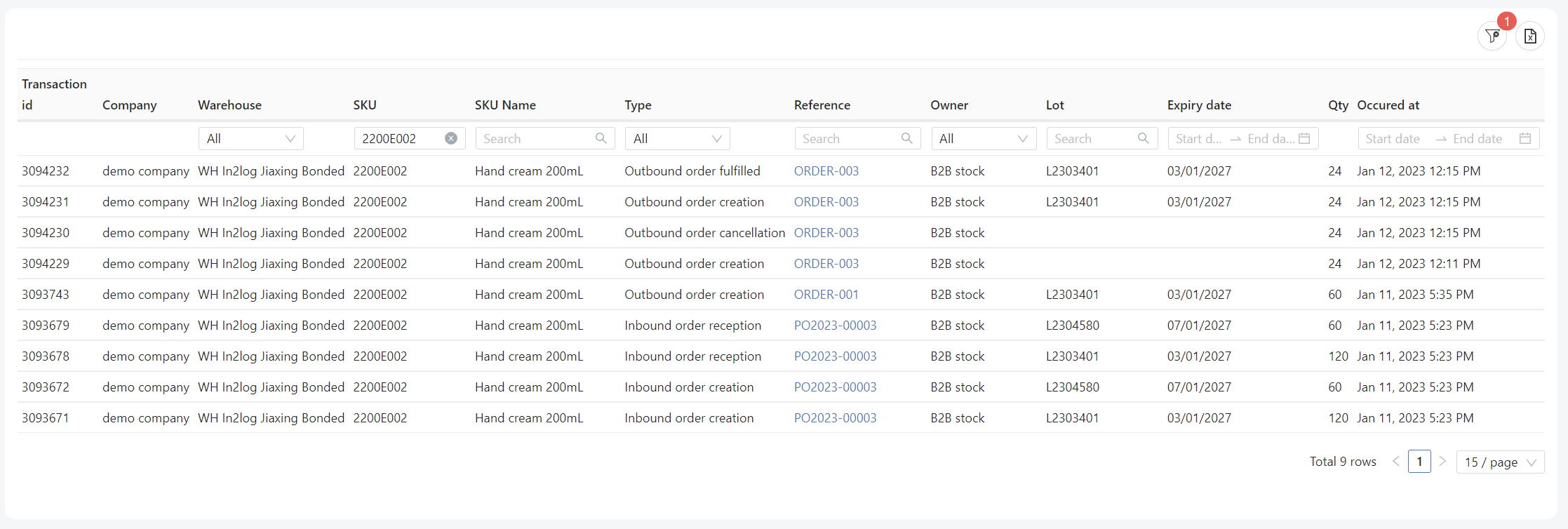
The stock here is the total stock for SKU 2200E002 in warehouse "In2log Jiaxing Bonded", for owner "B2B stock"
| Id | Time | Transaction | Transaction qty | Incoming | Available | Allocated |
|---|---|---|---|---|---|---|
| - | - | Initial stock | - | 0 | 0 | 0 |
| 3093671 | Jan 11, 2023 5:23 PM | Inbound order creation 1st lot | 120 | 120 | 0 | 0 |
| 3093672 | Jan 11, 2023 5:23 PM | Inbound order creation 2nd lot | 60 | 180 | 0 | 0 |
| 3093678 | Jan 11, 2023 5:23 PM | Reception 1st lot | 120 | 60 | 120 | 0 |
| 3093679 | Jan 11, 2023 5:23 PM | Reception 2nd lot | 60 | 0 | 180 | 0 |
| 3093743 | Jan 11, 2023 5:35 PM | ORDER-001 creation | 60 | 0 | 120 | 60 |
| 3094229 | Jan 12, 2023 12:11 PM | ORDER-003 creation | 24 | 0 | 96 | 84 |
| 3094230 | Jan 12, 2023 12:15 PM | Shipment of ORDER-003: de-allocate line with no lot | 24 | 0 | 120 | 60 |
| 3094231 | Jan 12, 2023 12:15 PM | Shipment of ORDER-003: allocate line with real lot L2303401 | 24 | 0 | 96 | 84 |
| 3094231 | Jan 12, 2023 12:15 PM | Shipment of ORDER-003: ship line with lot L2303401 | 24 | 0 | 96 | 60 |
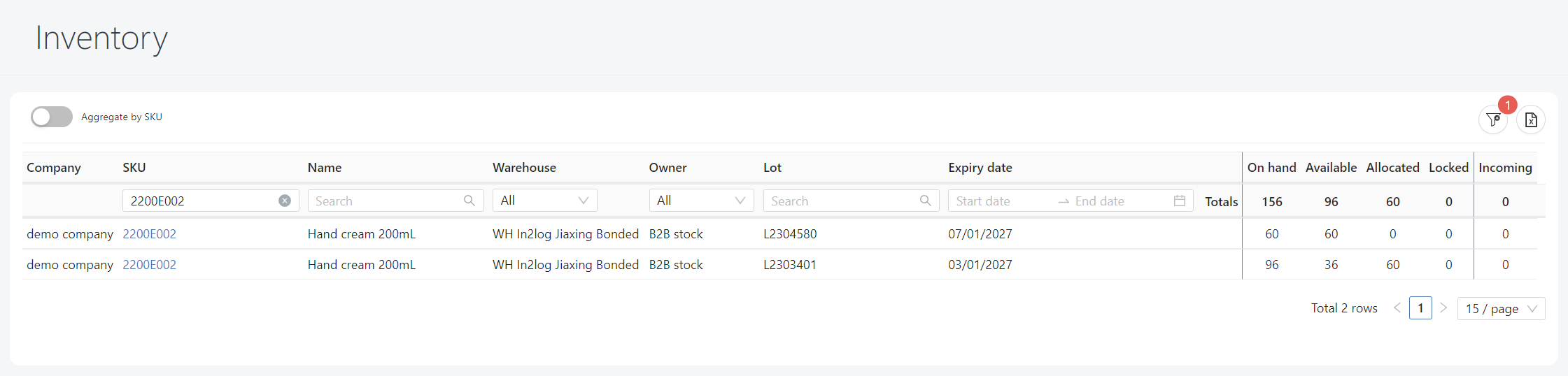
The result stock is as below, with detailed by lot: