Quick tour
Quick tour is a one minute reading walk-through Hubble platform. It only gives a quick overview of the whole possibilities of the platform.
Please check the different detailed documentations to know more about Hubble!
Hubble platform at a glance
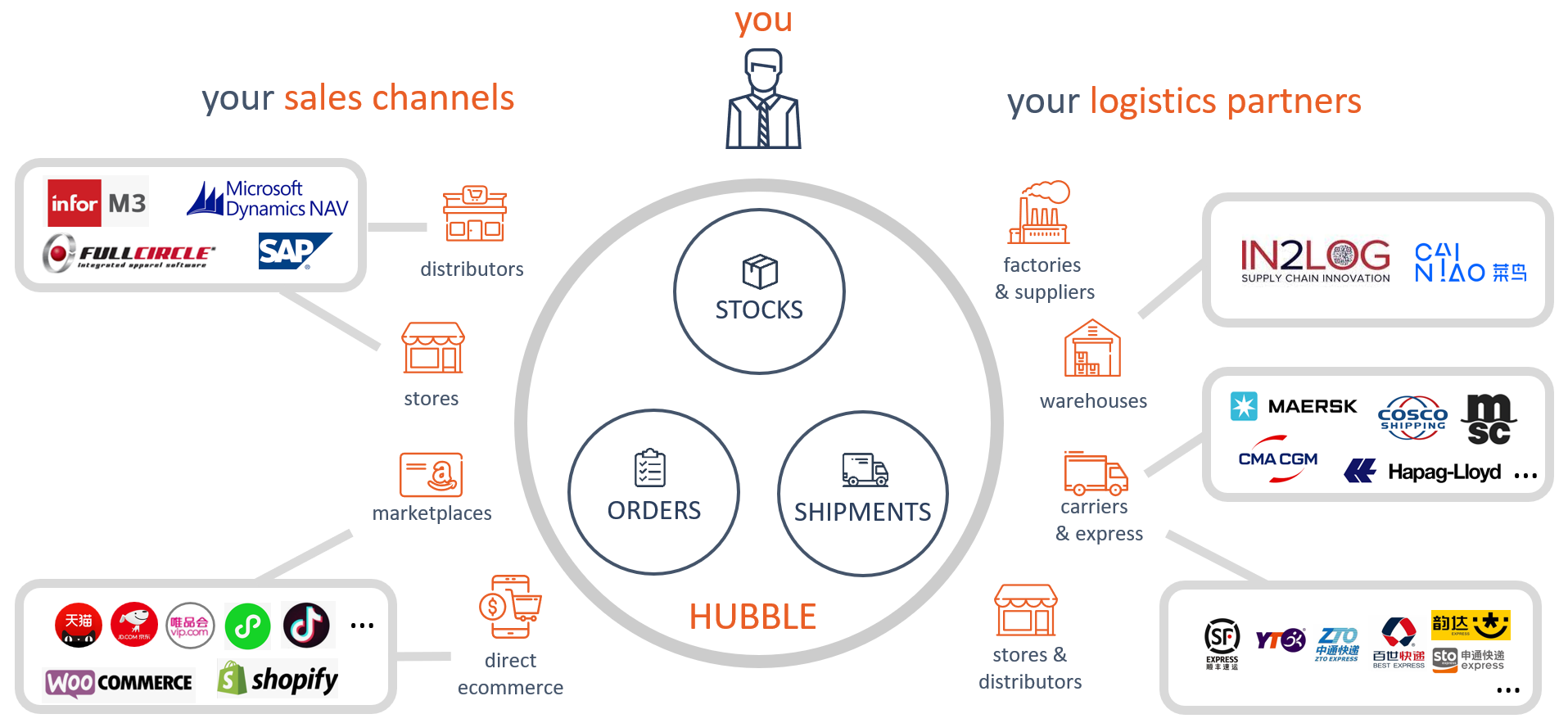
Hubble is a collaborative online platform that allow brands to collaborate with their Supply Chain partners (factories, suppliers, warehouses, carriers, distributors, ...) and their sales channels in order to achieve a more efficient Supply chain.
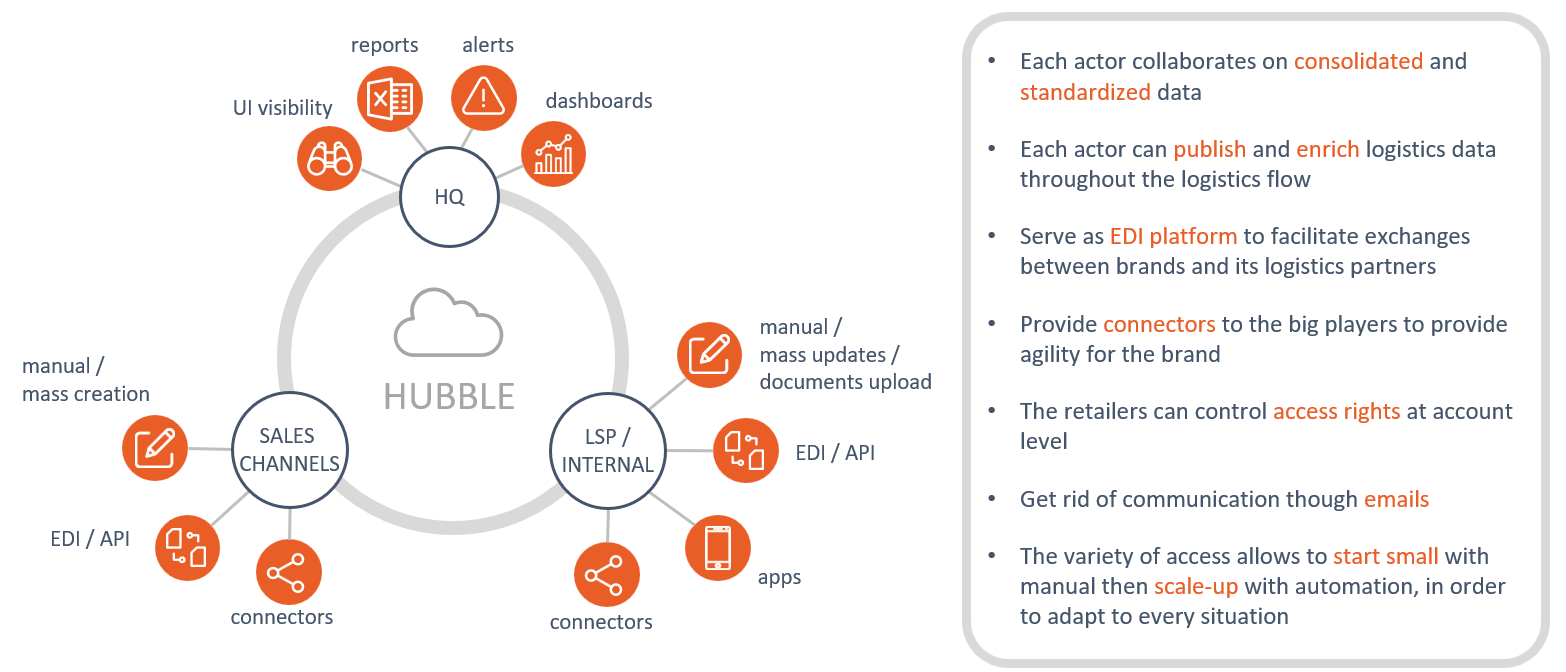
Hubble provides an online platform with an harmonized data model, and multiple entry points in order to allow any actor to collaborate nevertheless their system capabilities.
Flows
Hubble can help brans to manage the below flows:
- Distribution to B2B partners:
- order fulfillment (visibility and automation)
- transportation tracking
- E-commerce
- order fulfillment (visibility and automation)
- exception management (cancellations, changes, ...)
- transportation tracking
- Import/export
- PO management
- booking and shipment follow-up
- transportation tracking
Hubble can be used to manage all these flows in one single platform
Main data
Hubble is organized around the main below data:
- Master data
- Products and SKUs: Hubble manage its own item master, and actors can collaborate on logistics data (dimensions, weight, volume, qty per box, ...)
- Connections: manage each supply chain node with address and contact information
- Business data:
- Inbound orders: manage inbound reception on a given connection
- Outbound orders and Shipments: manage outbound shipment from a given connection (warehouse for distribution and e-commerce, factories for import/export)
- Inventory: manage stock for a given connection
Interactions
Hubble provides multiple entry points to let the different actors to create or modify the different data.
From less advanced to most advanced:
- Hubble reporting engine, that can be enabled by our team (custom reports might need to be developed)
- Hubble User Interface (UI), that can be accessible by any browser
- Hubble connectors, that can be enabled if you have Hubble subscription
- Hubble app, that can be use to have simple warehouse capabilities with any kind of Android devices.
- Hubble EDI or API, where Hubble team and/or your IT team develops in order to synchronized data between Hubble and your system(s)
See more details about interactions here.
Features
Hubble can help brands to automate their operations through different features:
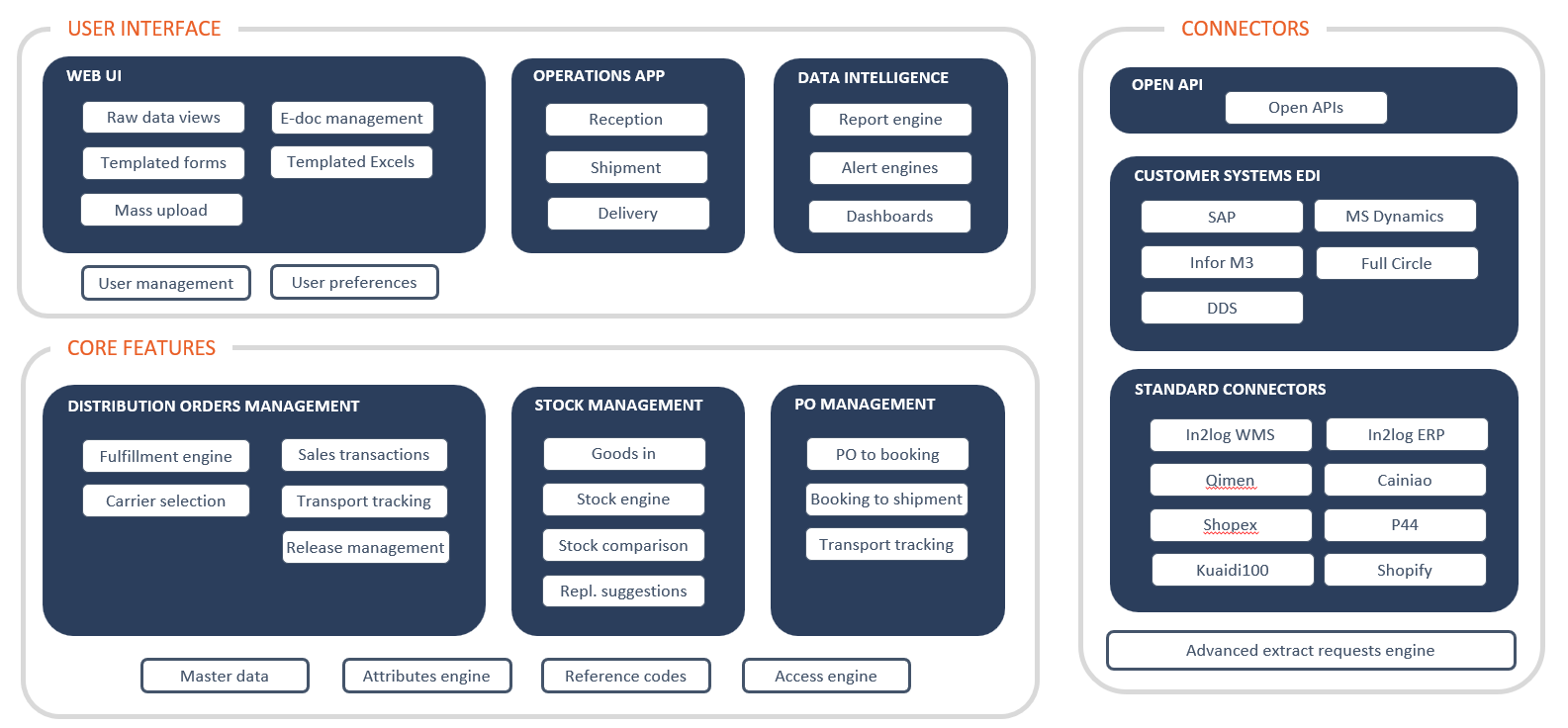
Web UI
Web UI can be access through any browser:
- Raw data views: Search and view master and business data
- Templated forms: Hubble offers customizable input forms where user can create and edit data through these forms
- Mass upload: Upload data massively from an Excel file
- E-doc management: Upload documents (photos, pdf, ...) and assign them to a specific element (a shipment, an order, ...)
- Templated Excels: Automatically generate Excel-based documents (invoices, delivery notices, ...
Operations app
Operations app can be used by small warehouses in order to process order fulfillment
- Reception: Receive goods based on orders or without orders (on-the fly reception)
- Shipment: Declare shipped goods based on outbound orders
- Delivery: Declare the effective delivery to the final customer (transportation tracking) or register anomalies, take picture of proof of delivery
Data intelligence
Get general insight on Hubble data:
- Report engine: Get reports by emails in order to passively receive data without connecting to Hubble (stocks, daily shipments, ...)
- Alert engines: Use Hubble to work as exception management: focus only on exceptions (missing stock, late orders, ...)
- Dashboards: Get summary data and KPIs from your Supply-Chain
Distribution Order Management
Automate order processing with Hubble:
- Fulfillment engine: Order detailed lifecycle during fulfillment
- Carrier selection: Automatically select the best transportation service for one order, automatically assign a tracking number to this order
- Sales transactions: Keep record of associated sales data for a specific order, including refunds
- Transport tracking: Track transportation status of parcels
- Release management: Hold orders for manual verification and release them manually
Stock management
Manage your stocks with Hubble:
- Goods-in: Tracking of goods-in in warehouse: purchase orders, return orders. ...
- Stock engine: Stock reservation for new orders, incoming stock management, details by lot or S/N...
- Stock comparison: Compare stocks between WMS and Hubble to guarantee accuracy
- Replenishment suggestion: Provides suggestion to buy or replenish if the stock is below a given threshold
PO management
Manage your export process through Hubble:
- PO to booking: Creates carrier booking from Purchase Orders
- Booking to shipments: Convert booking to shipments
- Transport tracking: Follow container status on sea, get updated ETA
Connectors
Connect third party systems to Hubble
- Open APIs: Create, update or get data through our set of standard APIs
- Customer systems EDI: Connect your systems to Hubble (ERP, OMS, TMS, ...)
- Standard connectors: Connect Hubble with Supply-Chain eco-systems main actors